Fellow EVers,
Join me in tracking your EV at http://evclub.org.
This is a handy sight a friend of mine put together to track your EV miles, fuel saved, money saved, carbon reduction, etc.
You can now follow my EV statistics on right side of this blog.
Check it out!
Saturday, November 17, 2012

Monday, September 3, 2012
Petition Time
There is a petition going to get the federal government to give us converters the same tax incentives that production vehicles are receiving. This would really help justify the cost needed. Please check out the following link and add your signature to the list.
https://petitions.whitehouse.gov/petition/we-should-support-oem-and-aftermarket-plug-vehicles-same-tax-incentives/V8qMBrGN?utm_source=wh.gov&utm_medium=shorturl&utm_campaign=shorturl
https://petitions.whitehouse.gov/petition/we-should-support-oem-and-aftermarket-plug-vehicles-same-tax-incentives/V8qMBrGN?utm_source=wh.gov&utm_medium=shorturl&utm_campaign=shorturl
Monday, August 20, 2012
Back on the road. Take 3, or is it 4 now?
Not much to say other than I drove the EV into work again today. I put everything back together this weekend and made some small modifications to how the batteries were secured to the car in that area (where the gas tank use to be). It was a huge pain to get them out and remove that one cell, so I felt I should changes things a bit. Nobody wants to get in there and take this thing apart, but the day will come again.
I've mounted my CellLogs further from the trunk lid. Hopefully this will keep the heat down and reduce my chances of further electronic glitches from. I'm still thinking this was the case of the failure, but don't have any proof without being there.
I've mounted my CellLogs further from the trunk lid. Hopefully this will keep the heat down and reduce my chances of further electronic glitches from. I'm still thinking this was the case of the failure, but don't have any proof without being there.
Tuesday, August 7, 2012
Battery Failure
After about a month back on the road I lost a cell. I drove to work, put it on the charger and it failed to charge. After further investigation I saw the problem.

I had lost a cell. It had expanded upwards! Here are some more pictures after I had removed it from the car.


I had lost a cell. It had expanded upwards! Here are some more pictures after I had removed it from the car.


This is how the battery was. I didn't pull the cells out and I'm not able to. They are very tight! There must be a hundred cells in these.

Here is a close up of one of the cells that ripped open. They are paper thin!

Wednesday, June 27, 2012
Battery load testing
I've been using the CellLog8 units for monitoring my high and low voltage for awhile now. I've yet to use the logging feature of the CellLog8S. Sadly I saved some money and only bought one unit that does the logging. I had to run seven seperate tests and the graphs don't match up for a really good comparison but I think the results still show what I wanted to know, "Which cells have had a significant increase in internal resistance".
The tests main goal was to take the cells to 3C (480 amps) and check for cells that are sagging too much.
All cells are connected with busbars except (15-16, 30-31, 37-38, 42-43, 45-46) which are connected with 2/0 cable.
This is the legend for cells 1-8 of each graph.

Cells 1 - 8
Cell 5 appears the be the worst of them. It sagged below 2.0v at 3C

Cells 9 - 16
These cells were fairly spread out from about 2.6v-2.85v. The lowest was 16 so this might be from any voltage sag across the cable.
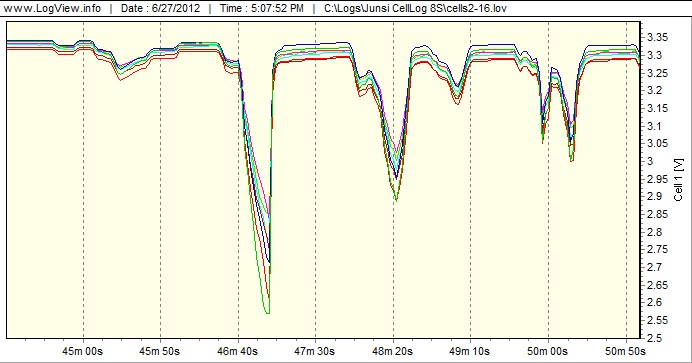
Cells 17-24
This group was mostly 2.8v-2.9v except cell 19 around 2.6v.

Cells 25-32
This group had cells in the range of 2.4v - 3.0v. The two that stand out are cells 30(2.4v) and 32(2.6v). 30-31 seperate the from and rear packs and would be the area to show the most voltage sag so I don't think this cell is as bad as it looks.

Cells 33-40
This group had a wide voltage range as well. Cell 33 was the worst at about 2.5v.

Cells 41-47
Nothing too bad here, worst cell being 47 at 2.8v.

Cells 48-54
By far the best group (these are all newer cells). All cells were around 3.05v-3.1v.

I'm frequently getting low voltage alerts (<2.5v) while driving and was curious how many cells were meeting this criteria. First I'll recheck the torque on the batteries, but assuming thtat is fine, it looks like I can replace the one cell and fix this. My normal driving never reaches 3C range unless I'm really needing to pass somebody. Replacing this one cell should remove the low voltage alerts most of the time. I have an extra cell sitting around that I've tested at 160Ah capacity. I'll replace cell 5 with it and hope the voltage sag on it is closer to the averages seen here.
Sunday, June 17, 2012
Heatsink replaced
I got some time yesterday and installed a new heat sink that I think will be more efficient while driving. I mentioned before the old heat sink below has the fins parallel with the controller, but the air while driving is perpendicular to the fins.
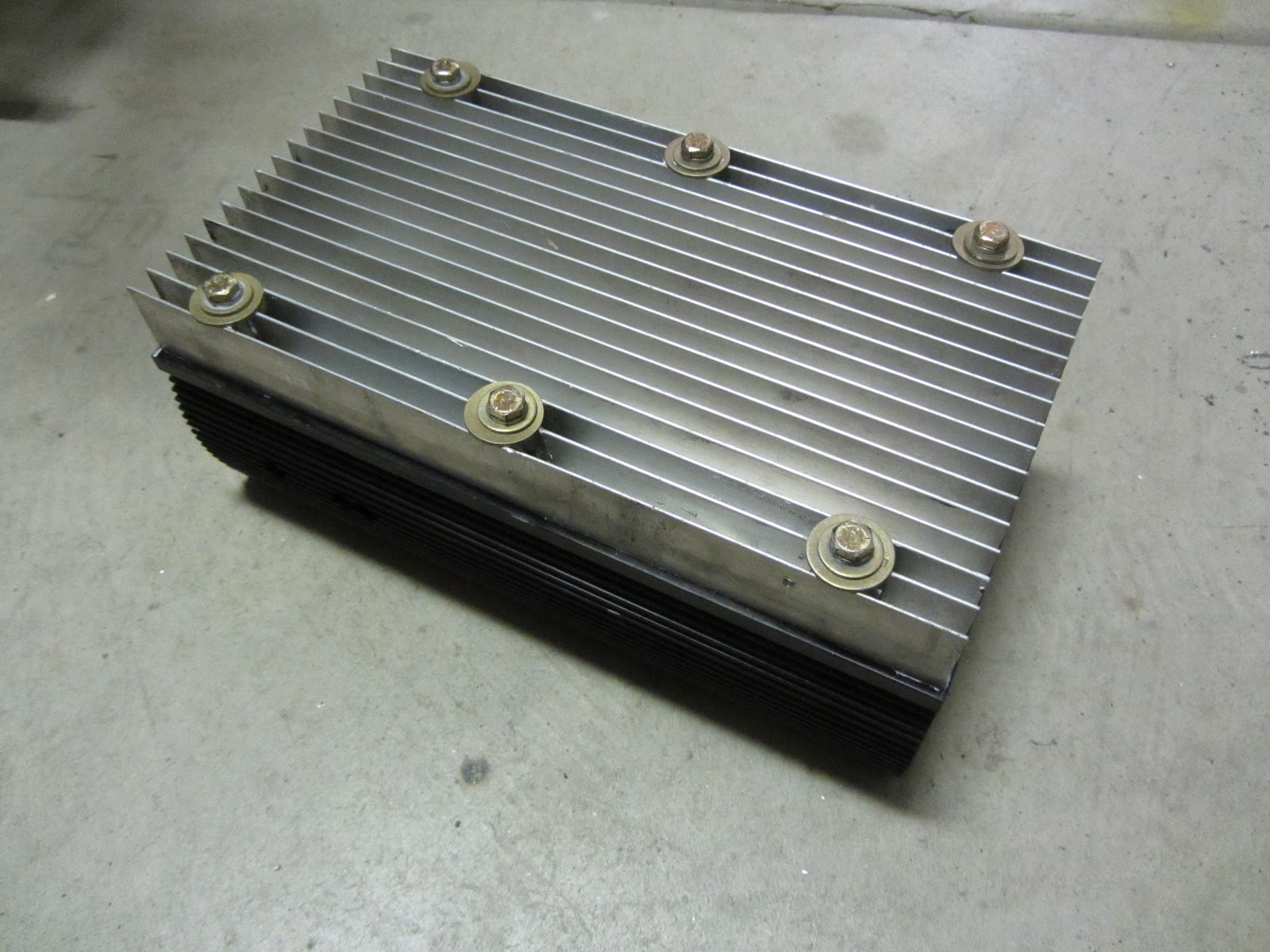
Here is the new heat sink attached to the controller. You can see the mill work done so the bolts are recessed now and touch the thicker base of the heat sink. This allows for more consistent torquing than before and should allow for better heat transfer. Don't forget your thermal compound when installing any heat sink. Thermal compound greatly increases the heat transfer

I wanted a better way to attach my temperature sensor for the controller. I made a little L bracket that attaches to one of the bolts.

Here is another shot with the sensor attached. I'll try to do some temperature comparisons next week, but with the increase in temperature just over the weekend it may be hard to get any reliable results.

Thursday, June 14, 2012
This is cool!
Awhile back when I was still running the ADC 9", I had installed the air conditioner around Fall time or so. Before summer hit, the ADC motor went out. Replacing with a Netgain Warp 9 I soon found out that only the transmission bolt patterns matched. The accessory side did not. The accessory output shaft was larger, the motor diameter, slightly larger. A few little things that made my existing AC setup worthless.
Now that I'm driving to work again, and the heat is coming, I figured it was time to rebuild the AC system. There was quite a bit of machine work needed, so luckily my uncle Duane had some time yesterday. The main pulley was bored out to 7/8" and a new key way made. A thin bushing was made that went on the shaft first. This slid to the furthest inward point on the shaft and allowed us to tighten against that and not allow anything to slowly walk in and rub on the housing. Next, I reinstalled the Netgain RPM sensor and finally the main pulley went back on. A 3/8" bolt, custom washer, and some Loctite then went on to keep everything in place. The mounting brackets base had to be cut and slid outwards about 1/4" to account for the new position of the main pulley.
Here are some pictures of the final system. You can see I reused the auto tension pulley from the original serpentine belt system. I reused the same belt I purchased the first time I did the AC. Luckily it was still the right length even after the positioning of the components shifted a bit.


Now that I'm driving to work again, and the heat is coming, I figured it was time to rebuild the AC system. There was quite a bit of machine work needed, so luckily my uncle Duane had some time yesterday. The main pulley was bored out to 7/8" and a new key way made. A thin bushing was made that went on the shaft first. This slid to the furthest inward point on the shaft and allowed us to tighten against that and not allow anything to slowly walk in and rub on the housing. Next, I reinstalled the Netgain RPM sensor and finally the main pulley went back on. A 3/8" bolt, custom washer, and some Loctite then went on to keep everything in place. The mounting brackets base had to be cut and slid outwards about 1/4" to account for the new position of the main pulley.
Here are some pictures of the final system. You can see I reused the auto tension pulley from the original serpentine belt system. I reused the same belt I purchased the first time I did the AC. Luckily it was still the right length even after the positioning of the components shifted a bit.


I took it out for a drive today after I finished. It was about 92F outside, so not too bad but hot enough when the top is up to make you start sweating pretty quick. I turned on the AC and instantly the temperature dropped to a very comfortable level and remained there for a quick 10 mile test. Too cool! No more hot days driving home.
The heat from the condenser now passes right by my motor controller and that heat sink. I'm now noticing the temperature of my motor controlling running much hotter. I'll be replacing that heat sink next with one where fins run parallel with the wind, compared to perpendicular as they do now. More on that later.
Monday, June 11, 2012
Back to work
I drove the S2K to work all last week and things are looking pretty good. I'm using 100Ah to get from home to work and 65Ah to get back home. This gives a pretty idea of what a 2,000 ft elevation climb will do to your range. Since my weakest cell is still delivering nearly 140Ah, I should be in good shape for quite some time.
Air Conditioning:
The weather is going to start heating up. Later this week I have plans to meet up with my uncle and get some machine work done. Afterwards, I can rebuild the brackets to mount the compressor and I should have a comfortable commute home in the afternoon. I'll post some pictures of the AC system when completed.
Air Conditioning:
The weather is going to start heating up. Later this week I have plans to meet up with my uncle and get some machine work done. Afterwards, I can rebuild the brackets to mount the compressor and I should have a comfortable commute home in the afternoon. I'll post some pictures of the AC system when completed.
Sunday, June 3, 2012
My worst cell
I was curious to see how much my cells have degraded so I took the car out for a test drive. I forgot how much I missed this car until I dropped the top and drove through the hills. What a blast!
I drove 65 miles and brought it home using 137 Ah. At this point my check engine light was coming up with only about 1C draw so I new at least one cell was getting low. I saw that my voltages were fairly well scattered around which was expected considering how scattered the self discharge seems to be.
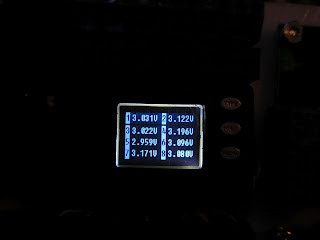
Below are the photos of each cells voltage starting from the back of the car and working forward. There is one cell at 2.7v. This cell is basically dead and my worst cell. I'll probably yank or replace at least it. I have two more cells at 2.9 which means there is maybe another 5Ah in them tops. Most of the remainder of the pack is around 3.1. I'm guessing there is at most 10Ah in these cells. On the last two pictures you'll see sequentially 10 cells which are all 3.25v. These are the additional cells I added about 1.5 years go which have almost no miles on them compared to the others. They are still happy and have at least 20-25Ah left in them I'm guessing.
So this means that my worst cell is still giving me just over 85% capacity after four years. If I hadn't over charged some cells slightly, and over discharged multiple times, and never went over the 3C rating, I would be a bit upset. Considering the abuse I'm guessing this is right on par with what's to be expected.



So now I'm debating what to do. Ultimately I'm thinking I'd like to go with a much higher pack, say 350v using 100Ah CALB cells. These cells are now rated at 4-5C with 10 second bursts of 8C! This would require multiple changes. First and obviously the pack needs to be completely replaced which isn't cheap. Second the motor controller would need to be replaced with something like the Netgain or Soliton1 which allows high input voltage but you can regulate the motor side voltage to keep it safe. This also equates to even lower cell side amperage draws which should be easier on the cells. I'd also need to replace the charger. No hard feeling here though. The Thundersky charger is twice the size of say the Manzanita Micro charger for the same output (did I mention is weighs twice as much too?).
My other thought is to slowly replace the TS 160Ah cells as they wear out with CALB 180Ah cells. Physically they are identical so no mods would be required. These cells are also 4-5C rated so they can handle the amps my modified Curtis is demanding. I've got some thinking to do.
Either way, before I get back on the road any time soon, the AC needs to be redone. I'll need to engineer the mounting bracket (again) and machine some parts for the pulley. It's a shame it wasn't a direct bolt on replacement from the ADC 9".
It's suppose to cool off next week, so despite no AC, I think I'll drive it to work and see how the batteries hold up before investing any further time.
I drove 65 miles and brought it home using 137 Ah. At this point my check engine light was coming up with only about 1C draw so I new at least one cell was getting low. I saw that my voltages were fairly well scattered around which was expected considering how scattered the self discharge seems to be.
Below are the photos of each cells voltage starting from the back of the car and working forward. There is one cell at 2.7v. This cell is basically dead and my worst cell. I'll probably yank or replace at least it. I have two more cells at 2.9 which means there is maybe another 5Ah in them tops. Most of the remainder of the pack is around 3.1. I'm guessing there is at most 10Ah in these cells. On the last two pictures you'll see sequentially 10 cells which are all 3.25v. These are the additional cells I added about 1.5 years go which have almost no miles on them compared to the others. They are still happy and have at least 20-25Ah left in them I'm guessing.
So this means that my worst cell is still giving me just over 85% capacity after four years. If I hadn't over charged some cells slightly, and over discharged multiple times, and never went over the 3C rating, I would be a bit upset. Considering the abuse I'm guessing this is right on par with what's to be expected.


So now I'm debating what to do. Ultimately I'm thinking I'd like to go with a much higher pack, say 350v using 100Ah CALB cells. These cells are now rated at 4-5C with 10 second bursts of 8C! This would require multiple changes. First and obviously the pack needs to be completely replaced which isn't cheap. Second the motor controller would need to be replaced with something like the Netgain or Soliton1 which allows high input voltage but you can regulate the motor side voltage to keep it safe. This also equates to even lower cell side amperage draws which should be easier on the cells. I'd also need to replace the charger. No hard feeling here though. The Thundersky charger is twice the size of say the Manzanita Micro charger for the same output (did I mention is weighs twice as much too?).
My other thought is to slowly replace the TS 160Ah cells as they wear out with CALB 180Ah cells. Physically they are identical so no mods would be required. These cells are also 4-5C rated so they can handle the amps my modified Curtis is demanding. I've got some thinking to do.
Either way, before I get back on the road any time soon, the AC needs to be redone. I'll need to engineer the mounting bracket (again) and machine some parts for the pulley. It's a shame it wasn't a direct bolt on replacement from the ADC 9".
It's suppose to cool off next week, so despite no AC, I think I'll drive it to work and see how the batteries hold up before investing any further time.
Tuesday, May 29, 2012
Too much voltage, a new motor, and self discharge.
Sorry for the long delay in updates. I ran into just a couple months after starting to drive again (this was more than a year ago now). The ADC just couldn't handle the extra voltage and fried. The armature had a nice black burn on it. I debated getting it repaired but figured this motor was never intended for this much voltage. I purchased the gen 2 Warp9 which is suppose to handle a lot more voltage. It was also suppose to be a direct bolt in compared to the ADC 9. Some of this is true as the transmission mounted up perfectly. Unfortunately the motor itself is slightly longer and wider. I had to redo my motor mounts and the battery rack above the motor to get it to fit. The AC, of course, then also did not mount back up and I still haven't finished redoing it.
While driving though I did figure out the cutting out issue I'd been seeing. It was not the motor but the controller itself. It was switching frequencies and making a terrible jerking affect. My friend has now modifed the controller to remove this feature.
The car was done for quite awhile and then not driven at all the last year which led to another interesting discovery. Remember that I dropped all balancing boards to experiment to see the real need for this. Every 3 months or so I'd go out and plug the car back in to charge. Now, after a year I was getting ready to take it on a long drive and notice one cell was very low 3.1v resting. I charged the pack but only to replace about 20Ah in the pack. I then charged the one cell to find it took an additional 60Ah! My first thought was this cell is bad but it turns out most of pack was VERY unbalanced just from the self discharge. Each cell was different taking another 20-60Ah compared, I guess, to some of the better cells that didn't self discharge so bad. I'm in the process of replacing the balancers and getting the pack balanced again. I then plan to do another capacity test on this pack and see what shape it's in. I'm hoping to start driving it to work again when weather permits.
While driving though I did figure out the cutting out issue I'd been seeing. It was not the motor but the controller itself. It was switching frequencies and making a terrible jerking affect. My friend has now modifed the controller to remove this feature.
The car was done for quite awhile and then not driven at all the last year which led to another interesting discovery. Remember that I dropped all balancing boards to experiment to see the real need for this. Every 3 months or so I'd go out and plug the car back in to charge. Now, after a year I was getting ready to take it on a long drive and notice one cell was very low 3.1v resting. I charged the pack but only to replace about 20Ah in the pack. I then charged the one cell to find it took an additional 60Ah! My first thought was this cell is bad but it turns out most of pack was VERY unbalanced just from the self discharge. Each cell was different taking another 20-60Ah compared, I guess, to some of the better cells that didn't self discharge so bad. I'm in the process of replacing the balancers and getting the pack balanced again. I then plan to do another capacity test on this pack and see what shape it's in. I'm hoping to start driving it to work again when weather permits.
Sunday, November 21, 2010
Back on the road
It's been awhile but I have been working on the car as often as possible and I'm finally back on the road.
The original BMS didn't have any wire protection, if for some reason a wire got shorted out and burned up, you'd have to rerun that wire. I added small inline fuses to each cell at the battery. It's a little more cost and time, but something that's worth it in my opinion.
Here is a picture of the completed front end. Six batteries were removed from the original design to all for the AC compressor and pulley assembly. The good news is I finally have AC, but the news is it's winter time and I have to wait awhile to use it. However, part of this was to add the heater and on the cold mornings it really heats up the small cab space of this car quickly.

The motor controller was modified in multiple ways. First the Curtis "whine" was removed and the car is now completely silent, as an electric car should be. The maximum voltage was increased to allow for my fully charged voltage on 54 cells (I charge up to about 184v). Finally the amps was increased from 500 to 750. This made a huge difference in acceleration and overall power. My 0-30 went from (I think it was 7 seconds) down to less than 4 seconds. Overall the total power of the controller went from 72kW to just over 130kW.
I removed that large, and unreliable BMS screen from the dash and replaced it with the E-xpert Pro. This has turned out to be a great little display. On top of showing pack voltage, amps, Ah, and remaining runtime, it has some other extras and is highly configurable. You can customize this meter to your battery, driving needs and how hard you want to push your battery by setting what is considered full, empty, when to raise alarms, etc. So for example I setup mine to alert me when the pack is 30% SOC and to consider 20% SOC empty. This affects how the "fuel" gauge displays its bars. I also turned on a feature that will automatically add the back light as long as >1 amp is going through the shunt. As I drive the back light is on, and 10 seconds or so after stopping it turns off. I also configured the meter to consider the battery full when 184v is reached and the charger is at about 2 amps for at least 1 minute. This then resets the Ah counters and gauge and avoids any calibration errors that might allow the meter to slowly drift over time.

Here is the trunk now. I wouldn't call it finished because things are still a little messy and I'd like to get carpet back in there. Trunk space is still reduce, but I can at least fit something in there now if needed. The little black things on top of the charger are the new Cell Log 8 modules that I'm using to monitor high and low voltage conditions. These are about $13 a piece and will monitor 8 cells each. I build a little circuit board for each to simplify the wiring. They have an internal relay that allows you to provide signalling to the charger, a buzzer, light, etc. They are not isolated, however, so expect to use an additional relay on each module to isolate it. These modules will turn on when the charger is connected to AC power or the key is on.

Another thing I modified this round was the suspension. I added another 9 cells (over 100 lbs) and with so much additional weight in the rear I knew I couldn't avoid it this time. Online I found the spring rates saw that the rear springs were much stiffer than the front. The front springs were 245 lbs/in while the rear springs were 311 lbs/in. I moved the rear springs to the front of the car and replaced the rear with 10" (original springs are 11" unbound) 400 lbs/in springs. The put the rear exactly back to stock ride height and my front is still 1/4" lower but I think within range for alignment. I still need to take the car back down for an alignment to see if this will do.
It's great finally being back on the road. The gas to drive my truck 70 miles to work each day was really adding up. That and I just missed my car, too much fun to drive. I'll keep you posted on miles. I think around 16-17k miles total at this point.
The original BMS didn't have any wire protection, if for some reason a wire got shorted out and burned up, you'd have to rerun that wire. I added small inline fuses to each cell at the battery. It's a little more cost and time, but something that's worth it in my opinion.
Here is a picture of the completed front end. Six batteries were removed from the original design to all for the AC compressor and pulley assembly. The good news is I finally have AC, but the news is it's winter time and I have to wait awhile to use it. However, part of this was to add the heater and on the cold mornings it really heats up the small cab space of this car quickly.

The motor controller was modified in multiple ways. First the Curtis "whine" was removed and the car is now completely silent, as an electric car should be. The maximum voltage was increased to allow for my fully charged voltage on 54 cells (I charge up to about 184v). Finally the amps was increased from 500 to 750. This made a huge difference in acceleration and overall power. My 0-30 went from (I think it was 7 seconds) down to less than 4 seconds. Overall the total power of the controller went from 72kW to just over 130kW.
I removed that large, and unreliable BMS screen from the dash and replaced it with the E-xpert Pro. This has turned out to be a great little display. On top of showing pack voltage, amps, Ah, and remaining runtime, it has some other extras and is highly configurable. You can customize this meter to your battery, driving needs and how hard you want to push your battery by setting what is considered full, empty, when to raise alarms, etc. So for example I setup mine to alert me when the pack is 30% SOC and to consider 20% SOC empty. This affects how the "fuel" gauge displays its bars. I also turned on a feature that will automatically add the back light as long as >1 amp is going through the shunt. As I drive the back light is on, and 10 seconds or so after stopping it turns off. I also configured the meter to consider the battery full when 184v is reached and the charger is at about 2 amps for at least 1 minute. This then resets the Ah counters and gauge and avoids any calibration errors that might allow the meter to slowly drift over time.

Here is the trunk now. I wouldn't call it finished because things are still a little messy and I'd like to get carpet back in there. Trunk space is still reduce, but I can at least fit something in there now if needed. The little black things on top of the charger are the new Cell Log 8 modules that I'm using to monitor high and low voltage conditions. These are about $13 a piece and will monitor 8 cells each. I build a little circuit board for each to simplify the wiring. They have an internal relay that allows you to provide signalling to the charger, a buzzer, light, etc. They are not isolated, however, so expect to use an additional relay on each module to isolate it. These modules will turn on when the charger is connected to AC power or the key is on.

Another thing I modified this round was the suspension. I added another 9 cells (over 100 lbs) and with so much additional weight in the rear I knew I couldn't avoid it this time. Online I found the spring rates saw that the rear springs were much stiffer than the front. The front springs were 245 lbs/in while the rear springs were 311 lbs/in. I moved the rear springs to the front of the car and replaced the rear with 10" (original springs are 11" unbound) 400 lbs/in springs. The put the rear exactly back to stock ride height and my front is still 1/4" lower but I think within range for alignment. I still need to take the car back down for an alignment to see if this will do.
It's great finally being back on the road. The gas to drive my truck 70 miles to work each day was really adding up. That and I just missed my car, too much fun to drive. I'll keep you posted on miles. I think around 16-17k miles total at this point.
Wednesday, September 8, 2010
Trunk Ventilation
One issue I frequently dealt with was the charger shutting down due to over heating. I would finish work and come out to find a car with less than full charge. Luckily most of the time it had charged enough to still get my home, but I found myself a couple of times sticking around work another hour or more. The temporary solution was to leave the trunk slightly cracked during non winter months and this did the trick.
I plan to ensure adequate ventilation this time and have installed two 120mm fans. They will connect directly to the 240v charger source and run continuously during the charge cycle. The fans are quiet (30 dB), low speed (1900 RPM), move up to 67 CFM and take 7.5 watts of power each.
Here is a shot of the mounted fan. The trunk is big ugly at the moment but I plan to reinstall the carpeting after the modifications are complete.

Here is a shot from the bottom of the trunk. I've installed a vent which will deflect water spray while driving. They are angled to take the incoming air which should close the vents as well during speed.

I plan to ensure adequate ventilation this time and have installed two 120mm fans. They will connect directly to the 240v charger source and run continuously during the charge cycle. The fans are quiet (30 dB), low speed (1900 RPM), move up to 67 CFM and take 7.5 watts of power each.
Here is a shot of the mounted fan. The trunk is big ugly at the moment but I plan to reinstall the carpeting after the modifications are complete.

Here is a shot from the bottom of the trunk. I've installed a vent which will deflect water spray while driving. They are angled to take the incoming air which should close the vents as well during speed.

Thursday, September 2, 2010
Motor Cooling
One area I found that needed improvement was the motor cooling. There is an internal fan which does a decent job, but on longer commutes like mine the temperature of the motor just continues to rise. On really hot days I found the motor would cut out a little from time-to-time. My theory is this is the springs that hold the brushes down becoming too hot and allowing the brushes to float briefly.
My plan is to install four small fans directly above each set of brushes that turn on when the motor heats up using a thermostat. The thermostat is basically a temperature driven switch that will trigger a relay to turn on the fans. I selected 40C or 105F as the turn on. This will keep it from turning on during short trips but will ensure it starts cooling as soon as possible.
Here are the fans I used. They are 2" fans that do 20 CFM and draw .25 amps.

Here is one of the mounted fans and the thermostat. I made a bracket that attaches to the old temperature sensor and the thermostat bolts to the bracket.

When I manually enable the system I can feel a good breeze coming out the back the motor so that's a good sign. We'll see what happens after I get it back on the road.
My plan is to install four small fans directly above each set of brushes that turn on when the motor heats up using a thermostat. The thermostat is basically a temperature driven switch that will trigger a relay to turn on the fans. I selected 40C or 105F as the turn on. This will keep it from turning on during short trips but will ensure it starts cooling as soon as possible.
Here are the fans I used. They are 2" fans that do 20 CFM and draw .25 amps.

Here is one of the mounted fans and the thermostat. I made a bracket that attaches to the old temperature sensor and the thermostat bolts to the bracket.

When I manually enable the system I can feel a good breeze coming out the back the motor so that's a good sign. We'll see what happens after I get it back on the road.
Monday, August 30, 2010
More battery testing
I ordered 12 new cells for the upgrade. The plan was to replace the two cells that have had bad sag since day one and 10 new cells. I decided this would be a great time to do another capacity test for comparison against my original cells.
When I got the original cells I was told the factory capacity tests were all above 160, if I recall they were mostly around 165Ah. I charged a group of four new cells the same way I did the old cells. That is, not long after switching from CC stage into CV stage I remove charge and begin testing. The old cells were drained at ~130 amps until 2.5v and the worst cells yielded 145Ah, most around 150Ah. The new cells I only drained down to 2.8v and the reason is that at 2.8v they had produced 183.5Ah!
This raised a few thoughts of course and along with the fact they have improved the cells, I'm lead to believe that Sky Energy (CALB) who sells an equal size and weight 180Ah cell for more money is most likely selling the exact same battery. Unfortunately I don't have the 180Ah cells to test, perhaps they are getting 190-200Ah. I believe the batteries might be coming with more capacity also so that after time, they are still considered to be at their rated capacity or higher.
When I got the original cells I was told the factory capacity tests were all above 160, if I recall they were mostly around 165Ah. I charged a group of four new cells the same way I did the old cells. That is, not long after switching from CC stage into CV stage I remove charge and begin testing. The old cells were drained at ~130 amps until 2.5v and the worst cells yielded 145Ah, most around 150Ah. The new cells I only drained down to 2.8v and the reason is that at 2.8v they had produced 183.5Ah!
This raised a few thoughts of course and along with the fact they have improved the cells, I'm lead to believe that Sky Energy (CALB) who sells an equal size and weight 180Ah cell for more money is most likely selling the exact same battery. Unfortunately I don't have the 180Ah cells to test, perhaps they are getting 190-200Ah. I believe the batteries might be coming with more capacity also so that after time, they are still considered to be at their rated capacity or higher.
Trunk Mods Part II
Not much to show here. I've installed 15 additional cells in the area the old fuel tank use to be. This is directly above the rear sub frame. This is too much weight for the original shocks so I'll be modifying the suspension all around. Even though the sag isn't much, the suspension doesn't allow for much correction and the alignment was never back in spec causing inside tire wear. I plan to resolve that this time around.


Friday, August 27, 2010
Too Cool
After completing the trunk modifications I needed to modify the front racks to reduce the number cells and provide space for the air conditioning. Unfortunately during the first stages of the conversion I focused on getting batteries in and soon found I didn't have room for the AC. Wanting to make sure this didn't happen again, I decided to get the AC in and then see how many cells I could fit afterwards.
The first and probably hardest step determining how power the compressor. My first option was to modify the compressor to use a standard V belt. In this case it was easy to create a main pulley to attach to the motor. However I determined, after dismantling the compressor, it was going to be very difficult. My second option was to find/make a pulley that could use the same style of serpentine belt the compressor used. I opted for this method. I used the original pulley which accepted a spline shaft. The ADC 9" motor has a much smaller, round keyed shaft. I bought a 3/4" hub from tractor supply. I was able to get my uncle to turn down the hub and we then pressed it inside the original pulley with a hydraulic press. We ran a weld around one end to make sure it could turn inside. With this done it was just a matter of fabricating a frame that mounted the compressor and tensioner to the motor frame.
Here you can see completed setup. Reusing the tensioner instead of trying to make the compressor adjustable is the best route. The tensioner keeps the belt at the ideal tension as it stretches with age. This setup should be maintenance free for years.

Here is a shot from the other side.

I ordered from Jegs and got a Gates belt K060345. This is actually a bit over 35" and is the six v serpentine style belt used originally, just much shorter. This was stocked and I got a "free" hat. Considering their "free" shipping had a $5 handling fee, I'm not sure which one of the two I actually got free.
Here is a 12v functional test video. It's not nearly as noisy as this little camera picks up.
After everything was functional I needed to charge the AC system. The system had been opened for months, and even if it had only been opened for a day or so you need to do a lengthy evac process. An oil based vacuum pump is required which I bought one from Harbor Freight. You'll also need an AC manifold set which I also got from Harbor Freight.
The process is fairly simple. First connect the high(red) and low(blue) side hoses to the A/C system. The sizes are different so you can't accidentally connect the wrong one. This manifold set has a yellow hose and two spots where the yellow hose can connect, one is open and the other is a pressure fitting. Connect the yellow hose to the open side and then to the vacuum pump. Turn on the vacuum pump and then open the high and low valves. Let this run for several hours, the longer the better. The pump will get the system down fairly quickly, but it won't remove all the moisture this fast. You must leave it running to remove the moisture (3-5 hrs will do it). Once complete, first close the high and low valves, then turn off the vacuum pump.
You'll need to check the service manual to determine how much refrigerant should go into the system. You'll also need to replace any oil that was lost. There are refrigerants that contain oil, but it's not enough for a complete recharge so you'll need to do the math and figure out what you need.
The recharge process is simple. Read and follow the directions on the can first and foremost. Disconnect the vacuum pump and connect your refrigerant. The can should be shaken during the entire process. Open the valve on the can, then open the LOW side ONLY. Never open the high side valve while recharging. You'll hold the can upright and rotate 90 degrees every few seconds again given the can a good shake frequently. You'll want to make sure there is enough refrigerant and oil in the system before turning on the A/C system (again consult your service manual). Most systems should have a low pressure safety switch to prevent this. With the A/C system on max you'll notice the low side gauge drop as it compresses the gas to the high side. As it pulls from the low side more refrigerant from the can will pass into the system. As the can empties it slows down so be patient 5-15 minutes per can. Repeat this process to add oil and more refrigerant as needed. When complete close the low side valve, then close the refrigerant valve. The high and low side connectors can be popped off easily at this point, but when you disassemble the manifold some gases will escape so do this in a well ventilated area so you don't breath it in.
That was it, now I have some really cold air coming out of my EV!
The first and probably hardest step determining how power the compressor. My first option was to modify the compressor to use a standard V belt. In this case it was easy to create a main pulley to attach to the motor. However I determined, after dismantling the compressor, it was going to be very difficult. My second option was to find/make a pulley that could use the same style of serpentine belt the compressor used. I opted for this method. I used the original pulley which accepted a spline shaft. The ADC 9" motor has a much smaller, round keyed shaft. I bought a 3/4" hub from tractor supply. I was able to get my uncle to turn down the hub and we then pressed it inside the original pulley with a hydraulic press. We ran a weld around one end to make sure it could turn inside. With this done it was just a matter of fabricating a frame that mounted the compressor and tensioner to the motor frame.
Here you can see completed setup. Reusing the tensioner instead of trying to make the compressor adjustable is the best route. The tensioner keeps the belt at the ideal tension as it stretches with age. This setup should be maintenance free for years.

Here is a shot from the other side.

I ordered from Jegs and got a Gates belt K060345. This is actually a bit over 35" and is the six v serpentine style belt used originally, just much shorter. This was stocked and I got a "free" hat. Considering their "free" shipping had a $5 handling fee, I'm not sure which one of the two I actually got free.
Here is a 12v functional test video. It's not nearly as noisy as this little camera picks up.
After everything was functional I needed to charge the AC system. The system had been opened for months, and even if it had only been opened for a day or so you need to do a lengthy evac process. An oil based vacuum pump is required which I bought one from Harbor Freight. You'll also need an AC manifold set which I also got from Harbor Freight.
The process is fairly simple. First connect the high(red) and low(blue) side hoses to the A/C system. The sizes are different so you can't accidentally connect the wrong one. This manifold set has a yellow hose and two spots where the yellow hose can connect, one is open and the other is a pressure fitting. Connect the yellow hose to the open side and then to the vacuum pump. Turn on the vacuum pump and then open the high and low valves. Let this run for several hours, the longer the better. The pump will get the system down fairly quickly, but it won't remove all the moisture this fast. You must leave it running to remove the moisture (3-5 hrs will do it). Once complete, first close the high and low valves, then turn off the vacuum pump.
You'll need to check the service manual to determine how much refrigerant should go into the system. You'll also need to replace any oil that was lost. There are refrigerants that contain oil, but it's not enough for a complete recharge so you'll need to do the math and figure out what you need.
The recharge process is simple. Read and follow the directions on the can first and foremost. Disconnect the vacuum pump and connect your refrigerant. The can should be shaken during the entire process. Open the valve on the can, then open the LOW side ONLY. Never open the high side valve while recharging. You'll hold the can upright and rotate 90 degrees every few seconds again given the can a good shake frequently. You'll want to make sure there is enough refrigerant and oil in the system before turning on the A/C system (again consult your service manual). Most systems should have a low pressure safety switch to prevent this. With the A/C system on max you'll notice the low side gauge drop as it compresses the gas to the high side. As it pulls from the low side more refrigerant from the can will pass into the system. As the can empties it slows down so be patient 5-15 minutes per can. Repeat this process to add oil and more refrigerant as needed. When complete close the low side valve, then close the refrigerant valve. The high and low side connectors can be popped off easily at this point, but when you disassemble the manifold some gases will escape so do this in a well ventilated area so you don't breath it in.
That was it, now I have some really cold air coming out of my EV!
Thursday, August 19, 2010
Trunk Modifications Part I
I've been working on modifications to the car over the past couple weeks. In order to get the AC back into the car some of the cells needed be shifted from the front of the car to back. Additionally, I want to add a more cells. The only solution was to make better use of the trunk. The number of new cells I'll add is still not firm but I'm looking to add as many as possible for multiple reasons.
Here is a shot of the original trunk space. You can see there isn't much usable space currently above the fuel tank, about 3" and it opens up to only about 8-10" on the far right.

The old spot I use to have the charger has a curve to it and greatly reduces the usable space.


- Greater range. More cells means I have more energy and can travel further before recharging.
- Distributed load. The more cells I have, the less they have to work for my daily commute which will increase the life of the cells.
- Performance. Currently the 144v system allows the motor to hit about 4k RPM before the controller switches to VMax. Any additional increase in RPM greatly reduces torque requiring you to shift to a higher gear. Increasing the voltage will allow the torque to remain steady for higher RPM meaning the motor will want to rev out higher.
Here is a shot of the original trunk space. You can see there isn't much usable space currently above the fuel tank, about 3" and it opens up to only about 8-10" on the far right.

The old spot I use to have the charger has a curve to it and greatly reduces the usable space.

A couple of minutes with my plasma cutter and the rear most area is opened up and ready for a new battery rack.

This area now allows for storage of all 15 cells that used to take up the remaining trunk space (including charger). The rack is lined with a thin plastic and sealed to keep out water, etc. I used an expanding foam on the outside underneath the car to also fill in any open areas. The sides use a 1/4" thick steel for strength since the rack is also binding the cells together. If you use a thin metal it will bend as the cells begin to swell which is very bad on the cell life. It's amazing how much pressure is needed to contain them properly. The top (black) metal is much more light weight and designed to simply keep the cells from being able to shift upwards on bumpy roads or a rollover.

Next I will be working on the area where the gas tank use to sit. It looks like I can fit another 18 cells here if it all works out. I will need to make some suspension modifications for the extra weight I'm adding with these additional batteries.
Sunday, August 15, 2010
Battery testing
I have removed everything from the car to complete that to do list I created a long time ago and have been putting off (more on this later). While I had the batteries out I wanted to do a test to determine how much capacity is remaining now that the cells are about 1.5 years old and have over 15k miles. I've also calculated it takes me roughly 120Ah to get to work and 80Ah to return home (2k foot elevation climb to get to work). Using 15k miles, and the 70 mile commute that gives me about 214 trips I've made to work so far. Each round trip (120Ah + 80Ah) / 160Ah batteries = 1.25 charge cycles. Therefore, 214 x 1.25 is 267 charge cycles I've used.
Below is my battery testing solution.

My original testing plan was going to be to drain the batteries until the first cell reached low voltage, then rotate in another cell and continue testing to get results for each cell. After doing this only once I realized that the capacity of the cells was extremely close and it wasn't worth the extra time. I won't post all the results but basically my lowest cell produced 145Ah. I had other groups producing 148, 150, etc. They were all extremely close. Even the two cells that have terrible voltage sag still produced over 145Ah like the others. Now 145Ah is just over 90% of original capacity, however, remember my charging method was manual and I didn't give it the time to do much constant voltage charging. So to my surprise, I think I'm still near original capacity. The only thing is I didn't do this testing when the cells were new and I'm told they will have at least 160 but usually more, so it's possible I've lost more than I know. Either way this is good news and I'm quite happy with the results.
Below is my battery testing solution.
- Costco a 2300 watt power inverter. This allows me to test four batteries at a time to get my 12v source.
- 1500 watt space heater. This gives me just over 130 amp load on the batteries which is close to 1C and will give a decent enough load to test.
- E-Xpert pro battery monitor from TBS Electronics with a 500 amp shunt. This will track the Ah used for me and give accurate results compared to trying to calculate this myself based off of ever changing voltage/amperage as the batteries drain.
- CellLog8 allowed me to easily monitor each cells voltage to determine when a cell was too low during the load test or too high during recharge.
- For charging I used my original battery charger, a 12v charger I had, and my bench power supply. This allowed me to charge up to 45 amps and helped speed up the testing greatly. I only did quick charges and once the amperage needed was between 5-10 amps I stopped charging and begin the test. This means the cells were NOT fully charged (probably 90 - 95% is my guesstimate) which is important when reviewing the results below.

My original testing plan was going to be to drain the batteries until the first cell reached low voltage, then rotate in another cell and continue testing to get results for each cell. After doing this only once I realized that the capacity of the cells was extremely close and it wasn't worth the extra time. I won't post all the results but basically my lowest cell produced 145Ah. I had other groups producing 148, 150, etc. They were all extremely close. Even the two cells that have terrible voltage sag still produced over 145Ah like the others. Now 145Ah is just over 90% of original capacity, however, remember my charging method was manual and I didn't give it the time to do much constant voltage charging. So to my surprise, I think I'm still near original capacity. The only thing is I didn't do this testing when the cells were new and I'm told they will have at least 160 but usually more, so it's possible I've lost more than I know. Either way this is good news and I'm quite happy with the results.
Monday, June 28, 2010
In the name of science part II
If you recall from the last testing I put two Kelley controllers up against my Curtis 1231C. We did some repeated 0-30mph tests and compared times while monitoring the motor side amp output. The Curtis accelerated my car in second gear to 30mph in 7-8 seconds (nothing official just eye-balling a standard watch).
I've been in touch with a great guy who works at Curtis. This weekend I had the opportunity to test a modified Curtis 1231C. Unfortunately I only had a 500 amp shunt so we weren't able to test the motor side amps. I did see my battery amps peaking somewhere around 650-700 though as the controller reached Vmax. This controller reduced my 0-30 to 5 seconds. I will add the shunt later and get the real output from it soon.
He also has an even higher end modified 1231C, but we were having some issues with it. It should be 200 amps more or so. It would be nice to see a 3 second 0-30 :)
Unfortunately I can't give out any of the secret sauce that is being used to upgrade/modify these controllers since I didn't obtain the information myself and don't want to get anybody in trouble.
We should be doing some more tests with the 2nd upgraded controller later and I'll be sure to have the shunt ready for some numbers. I realize most people won't be able to make these modifications, but it should give you a good idea of expected acceleration for a given amount of continuous amps.
I've been in touch with a great guy who works at Curtis. This weekend I had the opportunity to test a modified Curtis 1231C. Unfortunately I only had a 500 amp shunt so we weren't able to test the motor side amps. I did see my battery amps peaking somewhere around 650-700 though as the controller reached Vmax. This controller reduced my 0-30 to 5 seconds. I will add the shunt later and get the real output from it soon.
He also has an even higher end modified 1231C, but we were having some issues with it. It should be 200 amps more or so. It would be nice to see a 3 second 0-30 :)
Unfortunately I can't give out any of the secret sauce that is being used to upgrade/modify these controllers since I didn't obtain the information myself and don't want to get anybody in trouble.
We should be doing some more tests with the 2nd upgraded controller later and I'll be sure to have the shunt ready for some numbers. I realize most people won't be able to make these modifications, but it should give you a good idea of expected acceleration for a given amount of continuous amps.
Tuesday, June 22, 2010
15/100
Things are still looking good on the daily commute. The car itself broke 100k miles a couple weeks ago and I'm now at 15k EV miles!
The increase in temperature has made a little improvement to the increasing voltage sag. I think the bottom line is I'm pushing these cells harder than I should for longevity. I believe my commute to work is using >80% capacity and this is taking a toll on capacity. Some mornings I have cell that is very close to fully discharged. I don't know how many miles I have left before at least one cell can't make it and possibly gets ruined to get me here.
I keep going in circles, but I'm leaning towards not selling it now. I'm thinking of making some modifications though now that I see how reliable the conversion itself is. Nothing official yet but here are some ideas I'm toying around with.
Motor controller: The Curtis 1231C has been reliable but I want to get the acceleration back in this car. I'm leaning towards the Soliton1 again for a few reasons.
The increase in temperature has made a little improvement to the increasing voltage sag. I think the bottom line is I'm pushing these cells harder than I should for longevity. I believe my commute to work is using >80% capacity and this is taking a toll on capacity. Some mornings I have cell that is very close to fully discharged. I don't know how many miles I have left before at least one cell can't make it and possibly gets ruined to get me here.
I keep going in circles, but I'm leaning towards not selling it now. I'm thinking of making some modifications though now that I see how reliable the conversion itself is. Nothing official yet but here are some ideas I'm toying around with.
Motor controller: The Curtis 1231C has been reliable but I want to get the acceleration back in this car. I'm leaning towards the Soliton1 again for a few reasons.
- It will increase my motor side amps from 500 to 1000.
- It's much larger and has great cooling with the option of water cooling if needed. In the hot summer days on my long commute doing 70mph the Curtis is kicking down the amps sometimes.
- It has many features that will make protecting the batteries, and motor a breeze. I'd like to add some features, but reduce complexity of the build and I think this will be a good step in that direction.
- I'll have the ability to run a pack voltage that is much higher than the voltage applied to the motor. This allows you to run more smaller batteries allowing you to still get the capacity you want, but make it easier to fit them. It also will remove volt sag during hard acceleration. The pack itself will sag, but if your pack voltage is high enough the motor will receive a steady voltage increasing performance even on those cold days.
Trunk mod:
I think I'll end up cutting out the current trunk and expanding it. There is a LOT of room that is not being utilized under there. This will allow me to add more batteries and even move some of the front batteries to the back giving me room to finally mount that AC that I've been missing.
Batteries:
Currently I'll just add some more cells (I'd like to add another 15 or so) so I can get as much from the existing cells. This should ease up on them and extend there life some on my commute. This will give me not only more capacity but the ability to crank up the motor voltage a bit also to increase high end performance along side of the low end performance I'll gain from the controller change.
BMS:
I'd like to get the car to a point where I don't have to look at anything and worry about what's going on. I want to simplify this side of things most of all. I want to be able to get in the car, look at my "fuel" gauge and know if I'm good to go. If there are any issues, then be able to connect something and diagnose the problem. I'm looking into some options for a low cost over haul here. The biggest problem with adding more and more cells is the complexity of protecting them.
As always, anything I do I'll document and share with you.
Tuesday, April 20, 2010
One year
I just realized it's been just over a year now since I started driving the car to work! I have 12k miles on the car and things are still working well.
I decided to do some quick math to see what 12k EV miles really means. The car originally got 26mpg on my commute. 12,000 miles/26 mpg = 461.5 gallons that I didn't burn this year. Gas in my area has been more or less $3 over the last year so that's $1384 dollars I would have spent on gas.
Although it's great to not have given my money to the oil companies or burned the gas, the actual conversion cost vs returns would never pay off before something needs to be replaced (i.e. batteries). EVs of some form are definitely the future, now we just need to wait for all the auto manufactures to get those production models out which will reduce costs. 2011/2012 will be a huge turn for the auto industry...I can't wait!
I decided to do some quick math to see what 12k EV miles really means. The car originally got 26mpg on my commute. 12,000 miles/26 mpg = 461.5 gallons that I didn't burn this year. Gas in my area has been more or less $3 over the last year so that's $1384 dollars I would have spent on gas.
Although it's great to not have given my money to the oil companies or burned the gas, the actual conversion cost vs returns would never pay off before something needs to be replaced (i.e. batteries). EVs of some form are definitely the future, now we just need to wait for all the auto manufactures to get those production models out which will reduce costs. 2011/2012 will be a huge turn for the auto industry...I can't wait!
Wednesday, March 10, 2010
10k miles and counting
I haven't been on here in awhile. I few weeks ago I finally hit the big 10k EV mile marker! Other than that there really isn't much to report. I'm still driving the car to work and things are great. The cold weather is still taking its toll on the batteries and the volt sag is high. This makes climbing the steep hills hard as I need more amps to account for the lower voltage but they seem to be dealing with it fine.
You may recall I reported two cells which sagged considerably more than the rest. I figured these would have went out by now but they are still working fine. On the down side, I now have two more cells that seem to sag more than before (about 0.4v under 2C load lower than the rest). I don't plan to replace any of them until they go out completely so I can really test them out. Speaking of replacing them, I noticed that Elite Power Solutions has finally dropped their prices to be more competitive with some of the other suppliers. We'll hopefully see a continuing trend making this option more affordable for all.
You may recall I reported two cells which sagged considerably more than the rest. I figured these would have went out by now but they are still working fine. On the down side, I now have two more cells that seem to sag more than before (about 0.4v under 2C load lower than the rest). I don't plan to replace any of them until they go out completely so I can really test them out. Speaking of replacing them, I noticed that Elite Power Solutions has finally dropped their prices to be more competitive with some of the other suppliers. We'll hopefully see a continuing trend making this option more affordable for all.
Friday, October 30, 2009
When to short is two long
So when I put everything back together last, I failed to mention a dummy moment I had. I managed to short out a cell for a couple of seconds. I really wasn't sure if I had done any damaged so thought I'd figure it out one way or the other before posting the results.
The cell was directly shorted out for a good two seconds, maybe a bit more, although it seemed liked a minute as I was jumping around trying to stop it. :)
I gave the cell a separate charge knowing I had discharged it quite a bit and definitely exceeded the maximum discharge amperage. Somewhere during the first or second week of driving to work the cell didn't have enough capacity to make it here and dropped to zero volts. I knew I had done some damage to it now, not from the zero volt, but the fact that it reached zero volts. If you recall, I've taken another cell to zero volts and it's still alive and kicking so no final verdict there yet.
I manually charged this cell up again for about a day at 5 amps, AFTER the pack itself had reached full charge. This one cell, however, would never fully charge. It seemed it internally had a self discharge of a couple amps maybe.
However, it continued to get me to work...until today. The cell reached zero volts again on the way to work and I knew it was time to replace it. This time, the cell would not charge...at all. I could not get the voltage above 0.7v and the cell got very warm when charging.
So although this is the extreme case of discharging at high rates, it may speak slightly to what happens to a cell when exceeding the maximum continuous ratings, just to a lesser degree. In short, it's bad :)
So, I've now lost my first cell. Luckily it was due to my own ignorance and not a failure for general use.
On a side note, I have noticed much greater voltage sag with the colder weather under load. This may be because the cells don't charge as much in this weather as well as the temperature it self during operation. It's about 45-50F when I leave in the morning and the car charges outside. We'll see how bad it gets when winter really kicks in here.
The cell was directly shorted out for a good two seconds, maybe a bit more, although it seemed liked a minute as I was jumping around trying to stop it. :)
I gave the cell a separate charge knowing I had discharged it quite a bit and definitely exceeded the maximum discharge amperage. Somewhere during the first or second week of driving to work the cell didn't have enough capacity to make it here and dropped to zero volts. I knew I had done some damage to it now, not from the zero volt, but the fact that it reached zero volts. If you recall, I've taken another cell to zero volts and it's still alive and kicking so no final verdict there yet.
I manually charged this cell up again for about a day at 5 amps, AFTER the pack itself had reached full charge. This one cell, however, would never fully charge. It seemed it internally had a self discharge of a couple amps maybe.
However, it continued to get me to work...until today. The cell reached zero volts again on the way to work and I knew it was time to replace it. This time, the cell would not charge...at all. I could not get the voltage above 0.7v and the cell got very warm when charging.
So although this is the extreme case of discharging at high rates, it may speak slightly to what happens to a cell when exceeding the maximum continuous ratings, just to a lesser degree. In short, it's bad :)
So, I've now lost my first cell. Luckily it was due to my own ignorance and not a failure for general use.
On a side note, I have noticed much greater voltage sag with the colder weather under load. This may be because the cells don't charge as much in this weather as well as the temperature it self during operation. It's about 45-50F when I leave in the morning and the car charges outside. We'll see how bad it gets when winter really kicks in here.
Friday, October 16, 2009
Is it alive?
I realized I hadn't posted on in here in a couple months now! I'm just having too much fun driving and not working on the car.


I did tear it down just a couple weeks ago to look things over, make sure no welds had broke, check the motor brushes, etc. Everything looks great!
Since I had it all apart, I took the time to FINALLY install my version 2.0 of the LiFePO4 Volt Blocher.

I'm normally parked outside the garage these days as my truck sits here, but thought it was a nice shot charging with the solar inverters in the background.

You can definitely tell this is MY kid, just look at that EV GRIN?!?

Sunday, August 16, 2009
In the name of science
Today was a fun day with the EV. It's not often you have multiple components laying around to get to really test things. You do your research and buy components, then just hope for the best. Not today!
Today a group of friends brought over two of their Kelley controllers for some head-to-head comparisons against each other and my Curtis 1231C. The two Kelley controllers were a 144v 500 amp model, and a 120v 800 amp model.
We monitored pack side voltage and amps, as well as motor side voltage and amps. Sadly we didn't have a computer tracking the information for a nice graph later but the results were clear enough.
The tests we did, to try and be as accurate as possible, was a 2nd gear take off to 30mph. This requires no shifting and gives the motor a long low RPM scenario so we can measure amps.
We tried to do as little modification as possible to swap controllers so things didn't need to look good. There are a lot duplicate wires, duct tape and bailing wire. Not to mention the cardboard electric isolators and bungee cord hood tie downs.
Please don't let your final EV project look like this! :)

The Kelley 144v 500 amp controller was rather sad in my opinion. The highest recorded motor side output was 320 amps. Even in first gear that car felt like it had no power. We tried the "torque" and "speed" settings of the controller, but it didn't change much. The 0-30 test took 15 seconds on average!
Next the Kelley 120v 800 amp controller. Surprisingly this is in the exact same enclosure as the 500 amp version. We removed seven of my LiFePO4 cells to drop the pack voltage within spec of the controller. I bit of an apples to oranges test, but we had no choice here. Maximum recorded amps was 640 with a 0-30 time of 8 seconds. Much better, but where is the 800 amps this controller is claiming? Perhaps if you could record with enough accuracy you'd see this number for a fraction of a second. Even the 600 amps is gone in less than a second. From the instant you see 600+ amps, they start dropping fast and within seconds you're looking at 400 amps and then a slower drop off rate. I admit though, out of the hole the bottom end torque felt really good, it just didn't last long.
Technically we tested the Curtis first since it was in the car, but afterwards we tested it again to track a few points better after we understood a few things. The Curtis surprised me as we saw 535 amps at peak. The interesting point was this didn't fall down nearly as quick as the two Kelley's. We counted a full 5 seconds before we even fell below 500. Although the Curtis and Kelley 800 had nearly the same 0-30 of 7-8 seconds the main difference was that the Kelley started off very hard but with it quickly dropping amps it was hard to get to 30 mph in the end. The Curtis on the other hand pulled hard and consistently right past 30 mph.
Pack side measurements weren't really worth mentioning as they were consistant and reflected the performance seen on the motor side. None of the controllers were able to push the pack amperage above 500 amps. Even at the lowest RPM to get high motor side amps, the pack was only seeing 250 or around there during that. This opens my mind now to installing a higher end controller knowing I can really increase my low end without jeopardizing the pack.
Thursday, August 6, 2009
5000+ miles
I've been meaning to get a post in when I crossed the 5k mark but I've been busy with other things and haven't found the time. I was going to post a picture of me drinking a beer in a lounge chair to demonstrate the work that went into my 5000 mile maintenance, but again, I just haven't had time.
In short, that's pretty much what needed to be done to the car, nothing. I did raise the vehicle and get under there for an inspection. I wanted to make sure no bolts were missing or coming loose. Additionally I wanted to check for stress or crack marks in the motor mounts, batter racks, etc, but everything looked perfect.
I'm actually over 6k miles at this point. Roughly I think I have about 100 cycles on the batteries after the 4 months of driving @ 1.25 cycles per commute round trip. This is a pretty rough number, but good enough for general tracking of the cells life over the months and years to come.
In short, that's pretty much what needed to be done to the car, nothing. I did raise the vehicle and get under there for an inspection. I wanted to make sure no bolts were missing or coming loose. Additionally I wanted to check for stress or crack marks in the motor mounts, batter racks, etc, but everything looked perfect.
I'm actually over 6k miles at this point. Roughly I think I have about 100 cycles on the batteries after the 4 months of driving @ 1.25 cycles per commute round trip. This is a pretty rough number, but good enough for general tracking of the cells life over the months and years to come.
Wednesday, July 22, 2009
As bad as it gets, or is it?
Preface:
A few weeks I was driving to work and looked down at the TS BMS system for kWh. The reading was FAR lower than normal for being halfway to work. My first though was, "crap it didn't charge and I'm halfway between home and work". I decided to keep going and keep light on the throttle. I made it to work with power to spare. It turned out the pack was completely charged when I left home, but the BMS failed to recognize most of the energy that was charged into the pack.
The Post:
It's been about a week ago, and I was just pulling out from work to head home. I noticed the computer again didn't register that it had charged. I assumed it was an error and headed home. Sadly this time it wasn't a false alarm. I drove about 32 of my 35 mile trip home when the BMS started yelling about a low cell. Even more sadly, this didn't alarm me since the computer is always giving me false positives. Regardless I started watching the cells and noticed all of them were a bit low (2.8v on average) with the lowest one being 2.5v or so. As I continued to drive they all started dropping, but one more so than others. I could see it going 2.5, maybe 5 seconds goes by, 2.4v, etc. It didn't take any time to reach zero volts under load. At this point I figured I've lost a cell, but the other were still in the safe zone.
I got home and after turning my charger amps down to 2 began charging. It took a few hours until the cell was up to 2.8v and I cranked it back up to 30 amps and let it charge.
The next day I was hesitant to even try to make it to work, but I figured this is half the fun of owning an EV. I was surprised to find out that not only did I make it to work but that cell was in the top 5 or so under load meaning the internal resistance was not changed and it's still behaving pre-incident.
How much life, if any has been taken away from this cell? No clue and only time will tell if fails before the others. However, and most importantly, this shows these cells are able to take a lot more abuse than I figured.
A few weeks I was driving to work and looked down at the TS BMS system for kWh. The reading was FAR lower than normal for being halfway to work. My first though was, "crap it didn't charge and I'm halfway between home and work". I decided to keep going and keep light on the throttle. I made it to work with power to spare. It turned out the pack was completely charged when I left home, but the BMS failed to recognize most of the energy that was charged into the pack.
The Post:
It's been about a week ago, and I was just pulling out from work to head home. I noticed the computer again didn't register that it had charged. I assumed it was an error and headed home. Sadly this time it wasn't a false alarm. I drove about 32 of my 35 mile trip home when the BMS started yelling about a low cell. Even more sadly, this didn't alarm me since the computer is always giving me false positives. Regardless I started watching the cells and noticed all of them were a bit low (2.8v on average) with the lowest one being 2.5v or so. As I continued to drive they all started dropping, but one more so than others. I could see it going 2.5, maybe 5 seconds goes by, 2.4v, etc. It didn't take any time to reach zero volts under load. At this point I figured I've lost a cell, but the other were still in the safe zone.
I got home and after turning my charger amps down to 2 began charging. It took a few hours until the cell was up to 2.8v and I cranked it back up to 30 amps and let it charge.
The next day I was hesitant to even try to make it to work, but I figured this is half the fun of owning an EV. I was surprised to find out that not only did I make it to work but that cell was in the top 5 or so under load meaning the internal resistance was not changed and it's still behaving pre-incident.
How much life, if any has been taken away from this cell? No clue and only time will tell if fails before the others. However, and most importantly, this shows these cells are able to take a lot more abuse than I figured.
Wednesday, June 10, 2009
EV Bling
We'll the car has been up and running since mid February and I've been driving to work for probably a month and a half or so without any issues (other than the BMS glitches). I don't see any reason it won't keep running fine so I figured it was time to make things a little more official and add my EV Bling. OK I had way too much crap bought that I was going to add to the car but the more thought about it and placed items it just seemed a bit too nerded out. I settled on two changes to help announce the EVness of the car.
First I added the "EV" to the S2000 emblems on the side.

Second was the customized license plates. I had to make another DMV trip for these, but luckily this was routine and went smooth.

Sunday, June 7, 2009
Solar and PG&E (Pacific Gas & Electric)
I've been getting a few questions about my solar and how it all works in regards to the power company. I'll do my best to explain it.
The solar is directly connected to the grid through the inverter. The inverter is designed to not send power into the grid if the electricty is off. This prevents the power company from getting shocked if they shut down their side and want to be sure no solar systems are now powering those lines.
So the way it works here is the power company keeps track of the excess energy you produce during the day. This is done in the simplest terms by letting your meter run backwards. Then at night, lets say, when you're not generating any power your meter runs forward again and you recover that excess energy you created earlier. It's really a great setup since you don't have to worry about costly batteries that need replacing.
Additionally, and to some what complicate what I just said, we have a couple of options here and I went with a time of day (TOD) metering. Peak is 1pm-7pm, partial peak is 7-9pm and 9am-12pm, off peak is 9pm - 9am. This is Monday through Friday. The weekends don't have peaks and all holidays are also like weekends. For peak the energy rates start at about 30 cents per killawatt. Partial peak is about 14.5 cents, and off peak is 8.5 cents. What this means is while I'm at work and not using much energy not only am I making excess energy, but it's not really counted on the kW basis. It's tracked as credits in the form of currency. Later at night when I get home and start using the power again I'm buying it back at a cheaper rate than I sold it for. This helps out the power company to supply their power needs during the "peak" for all users and allows me to only require a system that generates about 75% of my energy use.
It gets more confusing yet...Each Peak, Partial Peak, and Off Peak have their own seperate tiers. Tiers, for those who don't aleady have to deal with this, is an alloted amount of energy you can use at a set price. Once you use more than this the price of the power increases. I believe for my power company their are 5 tiers. So even with the right sized system you might end up going up in tiers during off peak (night time and weekends) simply because you don't generate much here. However, you've also been getting paid quite a bit during peak to cover multiple tier pricing during off peak.
So that's how it all works for me with my power company. Hope this clears things up, I know it confuses me more. :)
The solar is directly connected to the grid through the inverter. The inverter is designed to not send power into the grid if the electricty is off. This prevents the power company from getting shocked if they shut down their side and want to be sure no solar systems are now powering those lines.
So the way it works here is the power company keeps track of the excess energy you produce during the day. This is done in the simplest terms by letting your meter run backwards. Then at night, lets say, when you're not generating any power your meter runs forward again and you recover that excess energy you created earlier. It's really a great setup since you don't have to worry about costly batteries that need replacing.
Additionally, and to some what complicate what I just said, we have a couple of options here and I went with a time of day (TOD) metering. Peak is 1pm-7pm, partial peak is 7-9pm and 9am-12pm, off peak is 9pm - 9am. This is Monday through Friday. The weekends don't have peaks and all holidays are also like weekends. For peak the energy rates start at about 30 cents per killawatt. Partial peak is about 14.5 cents, and off peak is 8.5 cents. What this means is while I'm at work and not using much energy not only am I making excess energy, but it's not really counted on the kW basis. It's tracked as credits in the form of currency. Later at night when I get home and start using the power again I'm buying it back at a cheaper rate than I sold it for. This helps out the power company to supply their power needs during the "peak" for all users and allows me to only require a system that generates about 75% of my energy use.
It gets more confusing yet...Each Peak, Partial Peak, and Off Peak have their own seperate tiers. Tiers, for those who don't aleady have to deal with this, is an alloted amount of energy you can use at a set price. Once you use more than this the price of the power increases. I believe for my power company their are 5 tiers. So even with the right sized system you might end up going up in tiers during off peak (night time and weekends) simply because you don't generate much here. However, you've also been getting paid quite a bit during peak to cover multiple tier pricing during off peak.
So that's how it all works for me with my power company. Hope this clears things up, I know it confuses me more. :)
Friday, May 29, 2009
Elite Power Solutions - Not so Elite
I've been waiting some time to post what I feared would be the case from this company, but I think it's time to let as many people know as possible.
As you're aware for those following along I've had a few, to say the least, issues with the BMS system I purchased from Elite Power Solutions. I've emailed them quite a few times along the way but never really got a fix to anything and it always resulted in me figuring out a work around to make the system happy.
Recently, I thought I had two bad cells. It turns out, again, the BMS was misreporting these cell voltages, but only under load (they show fine at standing voltage, but drop quicker in voltage on under load than they really are). Here is the email transaction. It seems to start off fine, but after well over a month, I just feel like I'm getting the run around.
EDIT (Emails Removed):
Turns out the emails sent around clearly stated they were not allowed to be posted anywhere for public view. I was nicely asked to remove these emails from my blog.
This is where it's at now. I'm sure they will not get back to me until I bug them again. They are more than happy to take your order, but don't count on that one year warranty being honored. As far as the TS cells themselves, I'm so far quite pleased. I only ordered them from somebody in the US hoping to get the customer service support if needed.
I'm probably screwed on ever getting this thing fixed and might just design my own or mix and match a few other options out there.
So where should you buy these cells from now? Dave over at EVComponents is offering the cells and a different charger and BMS system. I kick myself, because his cell prices are about 70% of what I paid from EPS. Check out his website at http://www.evcomponents.com/. They are working at keeping these cells in stock! This means no more 2-3 month turn arouund times either. Very promising for the EV world.
Update: Elite is sending yet another module out to replace the defective one. Sadly, I've discovered another issue with another module. This module has a problem with one cell where it will randomly cut the voltage in half (display only, the cell is fine). This in turn is telling the charger, if charging, there is a low voltage condition. To the charger this means terminiate immediately and do not restart. I've been lucky on the timing and so far have not been stranded while I was debugging the issue. I've since reduced my low voltage trigger to just above zero to prevent yet more false alarms. I'll keep you posted on the results of the second module replacement as well.
As you're aware for those following along I've had a few, to say the least, issues with the BMS system I purchased from Elite Power Solutions. I've emailed them quite a few times along the way but never really got a fix to anything and it always resulted in me figuring out a work around to make the system happy.
Recently, I thought I had two bad cells. It turns out, again, the BMS was misreporting these cell voltages, but only under load (they show fine at standing voltage, but drop quicker in voltage on under load than they really are). Here is the email transaction. It seems to start off fine, but after well over a month, I just feel like I'm getting the run around.
EDIT (Emails Removed):
Turns out the emails sent around clearly stated they were not allowed to be posted anywhere for public view. I was nicely asked to remove these emails from my blog.
This is where it's at now. I'm sure they will not get back to me until I bug them again. They are more than happy to take your order, but don't count on that one year warranty being honored. As far as the TS cells themselves, I'm so far quite pleased. I only ordered them from somebody in the US hoping to get the customer service support if needed.
I'm probably screwed on ever getting this thing fixed and might just design my own or mix and match a few other options out there.
So where should you buy these cells from now? Dave over at EVComponents is offering the cells and a different charger and BMS system. I kick myself, because his cell prices are about 70% of what I paid from EPS. Check out his website at http://www.evcomponents.com/. They are working at keeping these cells in stock! This means no more 2-3 month turn arouund times either. Very promising for the EV world.
Update: Elite is sending yet another module out to replace the defective one. Sadly, I've discovered another issue with another module. This module has a problem with one cell where it will randomly cut the voltage in half (display only, the cell is fine). This in turn is telling the charger, if charging, there is a low voltage condition. To the charger this means terminiate immediately and do not restart. I've been lucky on the timing and so far have not been stranded while I was debugging the issue. I've since reduced my low voltage trigger to just above zero to prevent yet more false alarms. I'll keep you posted on the results of the second module replacement as well.
Tuesday, May 26, 2009
DMV trip four
I realized when talking to a guy about my DMV experience that I hadn't posted the fourth, and I sure hope final trip to DMV for registration to Electric.
As you recall from trips two and three, I was told to come back when the registration was due. This would allow them to open the smog section in their computers so they could input the DMV ID number on the BAR cert and finally change the MP field from G to E.
Well, as I'm sure you can guess, the smog section still couldn't come up. They tried this and that, talking amongst themselves and about 30 minutes later...nothing. So the lady says, "Well your registration is due, would you like to pay and maybe that will open up the smog section?" What do I have to loose, I'm thinking. I pay and the computer spits out the new registration paperwork. Sure enough, the MP section is already set to E!
So, in hind sight I'm thinking their system has changed a bit. The BAR referee computer must now directly change type to avoid the whole DMV confusion process. I think if I would have waited for the due notice to come in the mail, I could have paid it online and received the updated E registration without any of the headaches I went through.
I have had a few people telling me that E means something else, or doesn't exist, etc. So I'm really not 100% sure if this is done, and won't know for two years when the smog would be due again. I think I'm good, but you never know with DMV. :)
As you recall from trips two and three, I was told to come back when the registration was due. This would allow them to open the smog section in their computers so they could input the DMV ID number on the BAR cert and finally change the MP field from G to E.
Well, as I'm sure you can guess, the smog section still couldn't come up. They tried this and that, talking amongst themselves and about 30 minutes later...nothing. So the lady says, "Well your registration is due, would you like to pay and maybe that will open up the smog section?" What do I have to loose, I'm thinking. I pay and the computer spits out the new registration paperwork. Sure enough, the MP section is already set to E!
So, in hind sight I'm thinking their system has changed a bit. The BAR referee computer must now directly change type to avoid the whole DMV confusion process. I think if I would have waited for the due notice to come in the mail, I could have paid it online and received the updated E registration without any of the headaches I went through.
I have had a few people telling me that E means something else, or doesn't exist, etc. So I'm really not 100% sure if this is done, and won't know for two years when the smog would be due again. I think I'm good, but you never know with DMV. :)
Thursday, May 21, 2009
2500 and counting
Today I broke 2500 miles on electric, woohoo! In general things have been really smooth with the build and I'm overall very happy. I'm really pleased with the lithium cells and the balancers I built. Hopefully the cells just keep us moving for many many years :)
OK, so there is one item I'm not completely happy with. The BMS from TS has some really great features all wrapped into one system. Many piece together things like amp meter, fuel gauge, etc. It was nice to find it all in one package, but this thing has been far from reliable.
You may recall my initial problems with charging where the BMS would freak out and start reporting cells at low voltages and such if the charger was at high amps.
The next thing I noticed was two cells that seemed to be sagging pretty bad under load. I placed a volt meter on them and they weren't sagging at all like the BMS reported. There are 5 modules, up to 10 cells connect to each. I switched around two of the modules and then I started getting two different cells (same module) that were reporting sag. I'm still waiting on a replacement from Elite Power Solutions. The first "replacement" didn't work at all and I had to send that one back.
I've also had a couple of occurrences where the charger just stops during the charge and I couldn't figure out why. I was at first assuming it was getting a little hot, so I started opening the trunk (until I get time to vent the trunk better). This seemed to fix it for a bit, but it started happening again. While driving the other day, the BMS alarm went off indicating one cell was about one volt lower than it really was (it immediately jumps back up to normal voltage). This has happened a couple of times now. During charging, any low voltage indication will terminate charging, so again the BMS shows its quality.
I have some plans to implement my own high and low voltage protection, and still use this BMS for the rest of it's functionality. This way if it blimps, it doesn't matter except for viewing purposes.
OK, so there is one item I'm not completely happy with. The BMS from TS has some really great features all wrapped into one system. Many piece together things like amp meter, fuel gauge, etc. It was nice to find it all in one package, but this thing has been far from reliable.
You may recall my initial problems with charging where the BMS would freak out and start reporting cells at low voltages and such if the charger was at high amps.
The next thing I noticed was two cells that seemed to be sagging pretty bad under load. I placed a volt meter on them and they weren't sagging at all like the BMS reported. There are 5 modules, up to 10 cells connect to each. I switched around two of the modules and then I started getting two different cells (same module) that were reporting sag. I'm still waiting on a replacement from Elite Power Solutions. The first "replacement" didn't work at all and I had to send that one back.
I've also had a couple of occurrences where the charger just stops during the charge and I couldn't figure out why. I was at first assuming it was getting a little hot, so I started opening the trunk (until I get time to vent the trunk better). This seemed to fix it for a bit, but it started happening again. While driving the other day, the BMS alarm went off indicating one cell was about one volt lower than it really was (it immediately jumps back up to normal voltage). This has happened a couple of times now. During charging, any low voltage indication will terminate charging, so again the BMS shows its quality.
I have some plans to implement my own high and low voltage protection, and still use this BMS for the rest of it's functionality. This way if it blimps, it doesn't matter except for viewing purposes.
Thursday, May 14, 2009
1.21 Gigawatts!
OK, so maybe I'm not harnessing the power of the lighting bolt, but the sun works well too. I've been patiently waiting as Acro Electric has been installing the solar system for the house, and more importantly the power to charge the car as well!
I kept climbing up on the roof when I'd get home from work to see what they had accomplished.
Day1:
Here is a picture of some of the anchor bolts installed for one of the two groups of panels.

Here is a close-up of one. You see all the black caulking that goes into the drilled hole. Additionally the black piece of flashing will be over the bolt and hole with the higher shingle laid over this as well see later. This flashing allows most, if not all, of the water never even get near the hole.

Day2:
Here is the south facing group of rails installed. You can now see how each anchor is covered by the flashing and slide under the higher shingle.


I kept climbing up on the roof when I'd get home from work to see what they had accomplished.
Day1:
Here is a picture of some of the anchor bolts installed for one of the two groups of panels.

Here is a close-up of one. You see all the black caulking that goes into the drilled hole. Additionally the black piece of flashing will be over the bolt and hole with the higher shingle laid over this as well see later. This flashing allows most, if not all, of the water never even get near the hole.

Day2:
Here is the south facing group of rails installed. You can now see how each anchor is covered by the flashing and slide under the higher shingle.

Here is a picture of the west facing group. I didn't have much south facing roof space so half of the panels went here.

Day3:
The panels and inverters are brought in for installation. The panels are from SunPower model SPR-225-BLK-U. They are small and rated for 225 watts a piece, which is quite a bit especially for their size. There are two inverters SPR-3000m and SPR-4000m. As you've probably guessed they are rated for 3k watts and 4k watts respectively. There are 28 panels total for a DC/STC rating of 6.3kW. This is fancy rating they give to "lab conditions" and you won't see these numbers in the real world. Therefore another rating is given (CEC/CSI) which is a "real world" rating of 5.56kW. The physical roof footprint is 393 sq.ft.

Here is the south roof again with the panels installed. They are a nice solid black color, you can't see the PV cells like you can with the other panels.

The west facing group.

Here is the west facing group again with some perspective of how little roof space was needed for half (3.15kW) of panels. I could really add a lot more if I need to.

Day 4 and 5:
The last couple days was doing all the wiring and finishing touches on the system.
Here are the two inverters mounted in my garage. You can also see the new 220v plug I had them install while they were at it for the car charger. I was running a long, and rather big, cable across my garage before.

Today was the first day they got to fully operate over the entire time frame of sun light and they produced 40kW. I'm pretty sure as summer really kicks in we'll get even more out of them.
Subscribe to:
Posts (Atom)


